Help Center
Account Menu
お知らせ:2026年1月13日から、ヘルプページとリリースノートの閲覧にログインが必要になりました
Year-end adjustment
SmartHR Help Center
Explore by feature
Year-end adjustment
③提出内容を確認する
年末調整機能の管理者メモを活用する
This page has not been translated yet.
年末調整機能の管理者メモを活用する
For:
Administrators
Plans:
Simple HR
HR Essentials
0 Yen
HR Strategy
従業員ごとに管理者メモを残せます。複数の担当者間の情報共有や引き継ぎなどに活用してください。
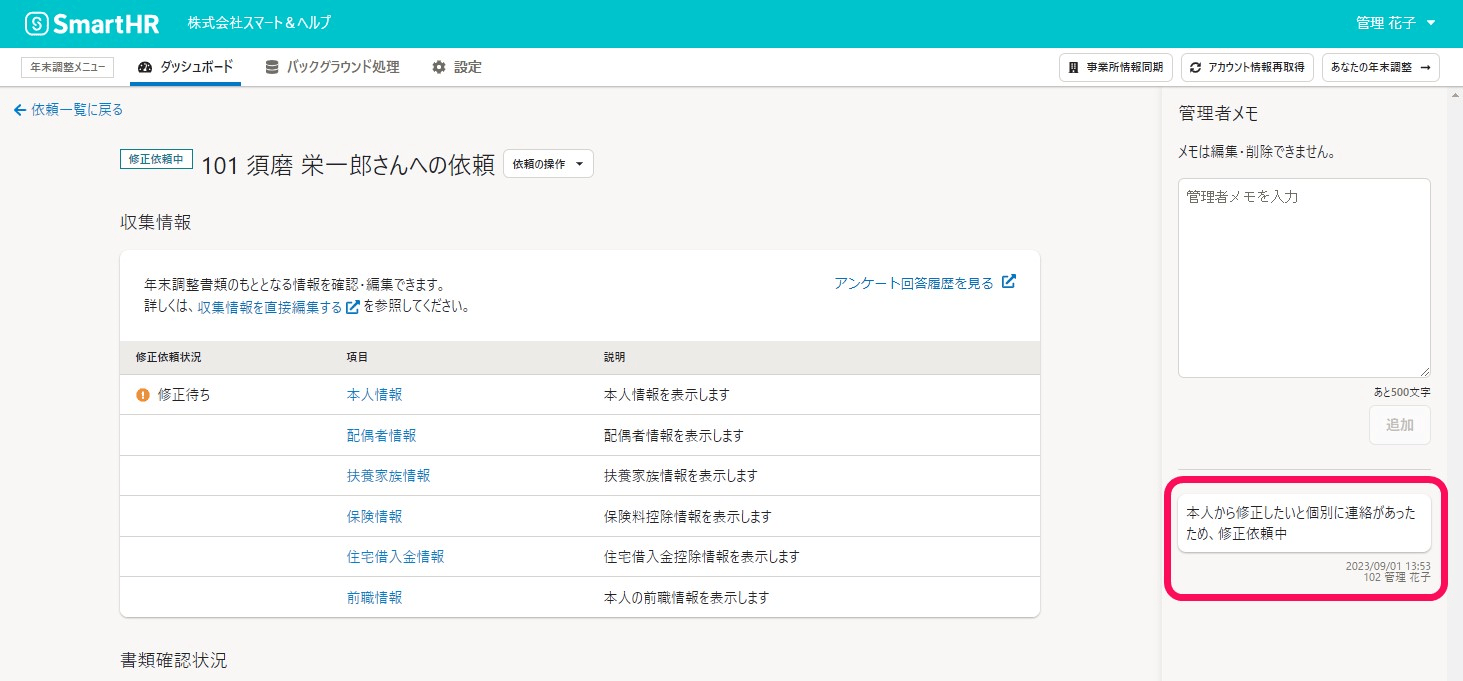
管理者メモは、依頼の詳細画面、書類と前職情報の確認画面から追加できます。
画像を表示する
Table of contents
管理者メモの追加
依頼の詳細画面から追加する
1. 依頼一覧画面の[依頼名]を押す
2.[管理者メモ]にコメントを入力し、[追加]を押す
書類と前職情報の確認画面から追加する
1. 書類一覧で[書類を確認]を押す
2.[管理者メモ]を押して表示を切り替える
3. コメントを入力し、[追加]を押す
管理者メモの仕様
書類と前職情報の確認画面で「最新の管理者メモ」を手早く確認する方法
管理者メモの追加
Please log in to read Help Page.
Log in using your SmartHR account.
Log in
ナビゲーションメニュー
Category
Administrator User Guide
Employee User Guide
Explore by feature
Settings
Employee list
Invitations
My Number
Procedures
Notification documents
Payslips
特別徴収税額通知管理
Withholding record
お知らせ管理
Year-end adjustment
Applications
申請ナビゲーション
発令管理
Organization chart
スキル・資格・研修
人的資本統計
データ連携
Links for various services
IdP
Paid options
SSO/SAML authentication
Documents
勤怠管理
Analytics & Reporting
給与計算
Employee surveys
Performance Evaluation
Placement simulation
キャリア台帳
学習管理
HRアナリティクス
採用管理
message
汎用申請
AIアシスタント
ID管理
Commuting route search
Other
Security
SmartHR API
契約と支払い
Support
 画像を表示する