
Help Center
Account Menu
お知らせ:2026年1月13日から、ヘルプページとリリースノートの閲覧にログインが必要になりました
Year-end adjustment
SmartHR Help Center
Explore by feature
Year-end adjustment
SmartHRで年末調整するための事前準備
年末調整機能の事前準備の流れ
This page has not been translated yet.
年末調整機能の事前準備の流れ
For:
Administrators
Plans:
Simple HR
HR Essentials
0 Yen
HR Strategy
このページでは、年末調整をはじめる前に行なう、SmartHR基本機能の設定、登録情報の確認・整備などの事前準備の流れについて説明します。
以下のフロー図を参考に、必要な作業を実施してください。
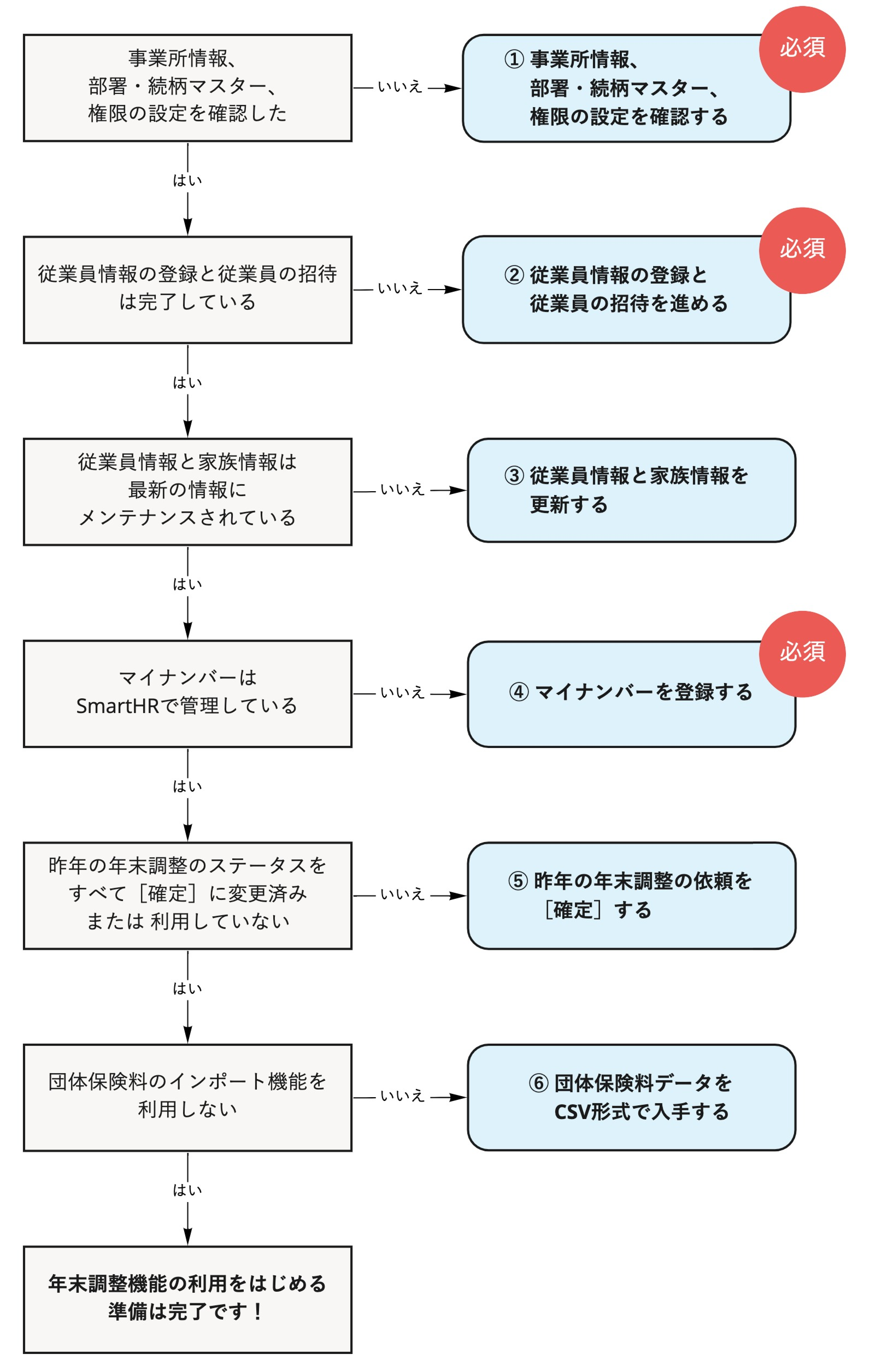
画像を表示する
Table of contents
年末調整機能に同期される基本機能のデータ
1. 事業所情報、部署・続柄マスター、権限の設定を確認する
会社情報・事業所情報の設定を確認する
部署・続柄のマスターデータを確認する
年末調整機能の権限を設定する
2. 従業員情報の登録と従業員の招待を進める
3. 従業員情報と家族情報を更新する
4. マイナンバーを登録する(従業員本人および扶養家族)
5. 昨年の年末調整の依頼を[確定]する
6. 団体保険料データをCSV形式で入手する
DAT形式のファイルしか取得できない場合
(任意)扶養家族や氏名・住所変更の申請を一時停止する
事前準備が完了したら
年末調整機能に同期される基本機能のデータ
Please log in to read Help Page.
Log in using your SmartHR account.
Log in
ナビゲーションメニュー
Category
Administrator User Guide
Employee User Guide
Explore by feature
Settings
Employee list
Invitations
My Number
Procedures
Notification documents
Payslips
Withholding record
Year-end adjustment
Applications
Organization chart
Links for various services
IdP
Paid options
SSO/SAML authentication
Documents
Analytics & Reporting
Employee surveys
Performance Evaluation
Placement simulation
message
Commuting route search
Other
Security
SmartHR API
Support